

TL;DR:
- Proper preparation and understanding of credit types streamline AIA course registration and renewal compliance.
- Active transcript monitoring and organized records prevent last-minute surprises during license renewal audits.
- Treating continuing education as a professional discipline enhances career reputation and firm leadership.
License renewal deadlines have a way of sneaking up on even the most organized professionals. One week you’re focused on project deliverables, and the next you’re scrambling to figure out how many Learning Units (LUs) you still need and whether you’ve registered for the right Health, Safety, Welfare (HSW) courses. The good news is that AIA’s online registration system is genuinely efficient once you understand its structure. This guide walks you through every stage, from what to gather before you start, to verifying that your completed credits show up correctly on your official transcript, so you can stay compliant without the last-minute panic.
Table of Contents
- What you need before starting your AIA course registration
- Step-by-step process for AIA course registration
- Troubleshooting and common mistakes in course registration
- How to verify completion and download your AIA transcript
- Why mastering AIA registration processes transforms your career
- Find more AIA-approved courses and support
- Frequently asked questions
Key Takeaways
| Point | Details |
|---|---|
| Gather prerequisites | Collect your AIA login, credit requirements, and transcript before registering for any course. |
| Follow step-by-step process | Accurately log in, select, and register for AIA courses, and keep track of all confirmations. |
| Verify completion promptly | Use AIA’s online transcript tool to confirm credits are posted, ensuring compliant record submission. |
| Avoid common errors | Watch out for missed emails, duplicate registrations, and expired credentials during the process. |
What you need before starting your AIA course registration
Before you get started with online registration, it’s crucial to have certain information and documents ready. Rushing into the process without the right credentials and context is one of the most common ways professionals waste time and end up frustrated. Think of this preparation stage as the foundation of a well-executed construction project. You wouldn’t pour concrete without a proper site survey, and you shouldn’t attempt course registration without checking a few key things first.
AIA account credentials
You’ll need your AIA member ID and the email address associated with your account. If you’ve forgotten either one, resolve that before anything else. The AIA helpdesk can assist, but allow time for a response if your deadline is approaching.
Understanding LUs and HSW requirements
The AIA requires licensed architects to earn a set number of Learning Units per reporting period, with a specific portion designated as HSW. LUs are the broader category covering all approved education, while HSW credits focus specifically on topics that protect public health, safety, and welfare in the built environment. Knowing exactly how many of each you still need prevents you from registering for courses that won’t help your specific compliance gap.
Your renewal deadline
State boards each have their own continuing education requirements and renewal schedules, and they don’t always align perfectly with the AIA’s reporting cycle. Check both your AIA renewal period and your state licensing board’s deadline before you register for anything.
Your current AIA transcript
This is perhaps the most important step. You can access AIA transcript records by logging in at aia.org, navigating to Education, and selecting View Transcript. You can also download a PDF version, which is what most state boards want to see for license renewal. Reviewing your transcript before registration tells you exactly which credits you already have and which gaps you need to fill.
| Document or item | Why you need it | Where to find it |
|---|---|---|
| AIA member ID | Required to log in and register | AIA account email or helpdesk |
| Valid email address | Confirmation and course access | Your AIA profile settings |
| Current transcript | Identify missing LUs and HSW | aia.org Education > View Transcript |
| State board deadline | Align registration with renewal | Your state licensing board website |
| Payment method | Complete enrollment for paid courses | Credit card or institutional billing |
- Confirm your AIA membership status is active before registering.
- Know the difference between LU and LU|HSW when filtering courses.
- Gather any employer or firm education codes if your organization covers tuition.
- Check whether your state requires a specific number of HSW credits beyond the AIA’s baseline.
- Note any topic-specific requirements your state board mandates, such as accessibility or energy code courses.
Pro Tip: Download your transcript as a PDF before you start shopping for courses. Seeing your credit gaps in black and white makes it far easier to filter and select the right courses without second-guessing yourself.
Step-by-step process for AIA course registration
Now that you have your documents and credentials ready, here’s exactly how to register for an AIA course online from start to finish. The process is more intuitive than it used to be, but there are a few places where professionals commonly lose time or make avoidable errors. Follow these steps carefully and you’ll move from browsing to confirmed enrollment without friction.
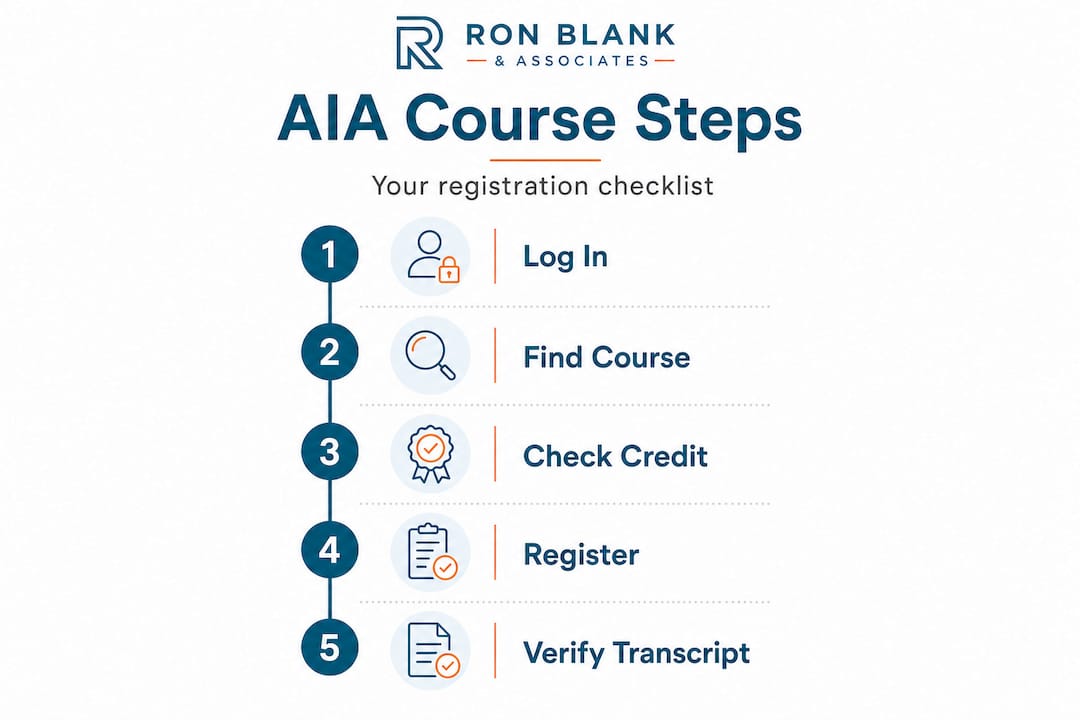
- Log in at aia.org. Go to the AIA homepage and click the login icon in the upper right corner. Use your member ID and password. If this is your first time logging in on a new device, expect a verification email.
- Navigate to the Education section. Once logged in, find the Education tab in the main navigation. This is your hub for course discovery, your transcript, and your registration history. Bookmark this page. You’ll be back.
- Search and filter courses. Use the search bar or the filter tools to narrow courses by credit type (LU or HSW), topic, format (online, webinar, podcast, or in-person), and provider. Be precise here. Filtering by HSW when you need those credits specifically will save you significant browsing time.
- Review course details. Before clicking register, open the course detail page and confirm the number of LUs awarded, whether they qualify as HSW, the course format, and any technical requirements. Some online courses require specific browsers or software, and finding out after enrollment is a headache you don’t need.
- Add to cart and confirm your selection. For paid courses, you’ll go through a checkout process. For free or member-included courses, the confirmation step is simpler. Either way, verify that the course code and credit type match what you intended.
- Complete payment or enrollment. Enter your payment details if required. Once your transaction is confirmed, you should receive a confirmation email within minutes. If you don’t see it within 15 minutes, check your spam folder immediately.
- Access your course. Most online courses will be accessible through your Education dashboard right after enrollment. Some may require a specific start date or a link delivered via email.
“The most common registration mistake we see is professionals selecting a course they assume is HSW-eligible without confirming it on the detail page. One wrong selection can leave you short on a specific credit type even if your total LU count looks fine.”
| Registration method | Best for | Key difference |
|---|---|---|
| AIA direct registration | AIA-provided courses | Transcript updated automatically |
| Third-party provider | External CE courses | You may need to self-report credits |
| Employer-organized group enrollment | Firm-sponsored training | Confirm individual credit tracking |
| Conference session registration | AIA Conferences | Credits logged under event code |
Pro Tip: Always review your access AIA transcript page after registering to confirm the course appears under your upcoming or in-progress education. Catching a registration gap immediately is far easier than discovering it days later.
Troubleshooting and common mistakes in course registration
After following the step-by-step registration process, it’s normal to encounter hiccups. The AIA platform is robust, but no system is perfect, and user errors are common enough that we see the same issues come up repeatedly. Knowing what to look for and how to respond quickly keeps a small problem from becoming a compliance crisis.
Account login failures
If you can’t log in, don’t waste time trying the same password repeatedly. Use the “Forgot Password” link immediately, and make sure you’re using the email address that’s on file with AIA. If that doesn’t work, contact the AIA helpdesk directly and have your member ID ready. Response times vary, so do this well before your deadline.
Course not appearing in your dashboard after registration
First, check your confirmation email. If you received one, the enrollment likely went through and the course may simply take a moment to appear in your dashboard. If you never received a confirmation, check your spam folder and then log in to verify via your Education dashboard. A missing confirmation email can also indicate a payment failure.
Credits not updating on your transcript
This is one of the most anxiety-inducing issues, especially close to a renewal deadline. For AIA-registered courses completed through the platform, credits usually update within a few days. If they haven’t appeared after a week, contact both the course provider and AIA directly. Having your certificate of completion ready will speed up the process.
Double registration and payment issues
It’s easier than you think to register for the same course twice, especially when you’re browsing quickly and can’t remember what you’ve already selected. Always check your Education dashboard for existing registrations before completing a new checkout. If a double charge occurs, contact AIA’s customer service with your transaction receipt numbers.
- Keep screenshots of every confirmation page, including the enrollment summary and payment receipt.
- Save all confirmation emails in a dedicated folder labeled by year and renewal period.
- Set a calendar reminder to check your transcript two weeks after completing any course.
- If you’re working toward a state board requirement, note whether your state accepts self-reported credits or requires AIA-verified records.
- Contact course providers directly if you believe credits were awarded but haven’t appeared after the standard update period.
“We’ve seen architects scramble during audits because they assumed their transcript was complete, only to discover a provider never submitted the credits to AIA. Proactive transcript checks are not optional. They’re professional discipline.”
Pro Tip: Create a simple spreadsheet that tracks every course you register for, including the course code, credit type, provider, completion date, and confirmation number. Cross-reference it with your access AIA transcript monthly during active renewal periods.
How to verify completion and download your AIA transcript
With registration completed and courses underway, you’ll need to confirm your progress is accurately documented. Completing a course and assuming the credits will sort themselves out is a gamble that professionals sometimes lose. Active verification is part of responsible license management.
- Log in at aia.org and go to Education > View Transcript. This page shows all credits on record, organized by reporting period. Review it after every course completion, not just once a year.
- Check LUs and HSW credits separately. The transcript displays both categories. Confirm that recently completed courses appear under the correct credit type. A course listed as LU when you needed LU|HSW is a significant issue and should be flagged immediately.
- Download the PDF version. Most state licensing boards require an official transcript for renewal documentation. The downloadable PDF includes your name, member ID, and a detailed list of completed courses with credit values. This is the document you’ll submit to your state board.
- Follow up on missing credits promptly. If a completed course doesn’t appear within seven to ten days, contact the provider first, then AIA if the provider can’t resolve it. Don’t wait until the end of your renewal period to discover a credit gap.
- Archive each version of your transcript. Save a dated copy of your transcript PDF at the start and end of each renewal period. If a discrepancy arises during an audit, having a historical record is invaluable.
Statistic callout: According to AIA guidelines, architects in most states are required to complete 18 to 24 LUs per two-year reporting period, with a minimum of 12 designated as HSW. Falling short on HSW specifically is a leading cause of compliance issues, even when total LU counts appear sufficient.
Staying on top of your transcript also positions you well when clients or project teams ask about your professional credentials. Being able to pull up a current, complete transcript on short notice is a small but meaningful signal of professional preparedness.

Why mastering AIA registration processes transforms your career
Most architects and engineers think of continuing education as a box to check, a compliance task to knock out before a deadline so they can get back to real work. We understand that instinct, but we’ve seen what happens to professionals who flip that perspective, and the difference is striking.
When you treat the registration and transcript management process as a professional discipline rather than an administrative burden, something shifts. You stop scrambling at renewal time because you’ve been tracking your credits steadily throughout the period. You walk into client meetings with a complete, current transcript you can cite. You’re the person in your firm who actually knows how to navigate the AIA education system efficiently, and that reputation has real value.
There’s also the audit angle. State licensing boards do conduct random audits of continuing education records, and professionals who have incomplete documentation or can’t quickly produce their transcripts face serious consequences. Mastering the registration workflow means you’re never caught off guard, because your records are always current and organized.
Beyond compliance, the habit of engaging regularly with AIA-registered courses puts you in contact with the latest thinking in building science, codes, sustainability, and materials. The architects and engineers who consistently pursue quality continuing education aren’t just staying licensed. They’re staying sharp, and that shows in their work and in how their firms and clients perceive them.
We’d also argue that understanding the nuances of the AIA system, knowing the difference between credit types, understanding how third-party providers submit credits, knowing how to read and download your transcript correctly, makes you a resource for your colleagues. In a busy firm, being the person who can calmly help a colleague sort out a registration problem is a form of leadership that doesn’t show up in a job title but absolutely shapes your professional standing.
Find more AIA-approved courses and support
When you’re ready for ongoing education, advanced topics, or more personal guidance, reliable resources are essential. Navigating the landscape of AIA-approved continuing education is much easier when you have a trusted partner in your corner.

Ron Blank & Associates has been developing and delivering AIA-approved courses for architects, engineers, interior designers, and contractors for years. Our courses are available as online self-paced modules, live webinars, podcasts, and face-to-face sessions, giving you genuine flexibility to earn credits in whatever format fits your schedule. Whether you’re filling a specific HSW gap or exploring advanced topics in building science and materials, our catalog is built to support your professional goals, not just your renewal checklist. Explore our offerings today and take the next step in your continuing education with confidence.
Frequently asked questions
Do I need to be an AIA member to register for courses online?
No, many AIA courses are available to both members and non-members, but members enjoy easier transcript tracking and automatic credit recording after course completion.
How can I check which Learning Units I still need to complete?
Log in at aia.org, navigate to Education, and select View Transcript to see your earned credits and identify gaps. You can also access AIA transcript records and download a PDF to analyze your LU and HSW totals in detail.
How long does it take for my completed course to show up on my AIA transcript?
Courses typically appear within a few days, but if credits are missing after a week, check with your provider and then follow up directly with AIA. Proactive tracking through your access AIA transcript page is the fastest way to catch and resolve any delays.
Can I use my AIA transcript as documentation for my state board license renewal?
Yes, you can download your official AIA transcript as a PDF and submit it directly to your state licensing board. Because most boards require this specific document, keeping a current downloadable version ready through your access AIA transcript page is a smart habit to build into your renewal routine.