

TL;DR:
- Proper registration and transcript management are essential to maintain compliance and avoid license delays.
- Using self-reporting and regular transcript reviews helps ensure all credits are accurately recorded.
- Preparation with required documentation streamlines the registration process for architects and course providers.
Missing a single credit hour because of a disorganized registration process can delay your license renewal and create compliance headaches that take weeks to untangle. For architects and engineers, staying current with AIA-approved continuing education is not optional, and yet the registration workflow trips up even seasoned professionals. Whether you are an architect trying to track your Learning Units or a building product manufacturer developing a compliant course program, understanding every stage of this process protects your standing and your investment. This guide walks you through the full workflow, from terminology to troubleshooting, so you can move forward with confidence.
Table of Contents
- Understand the architect course registration workflow
- Gather the requirements: What you need before registering
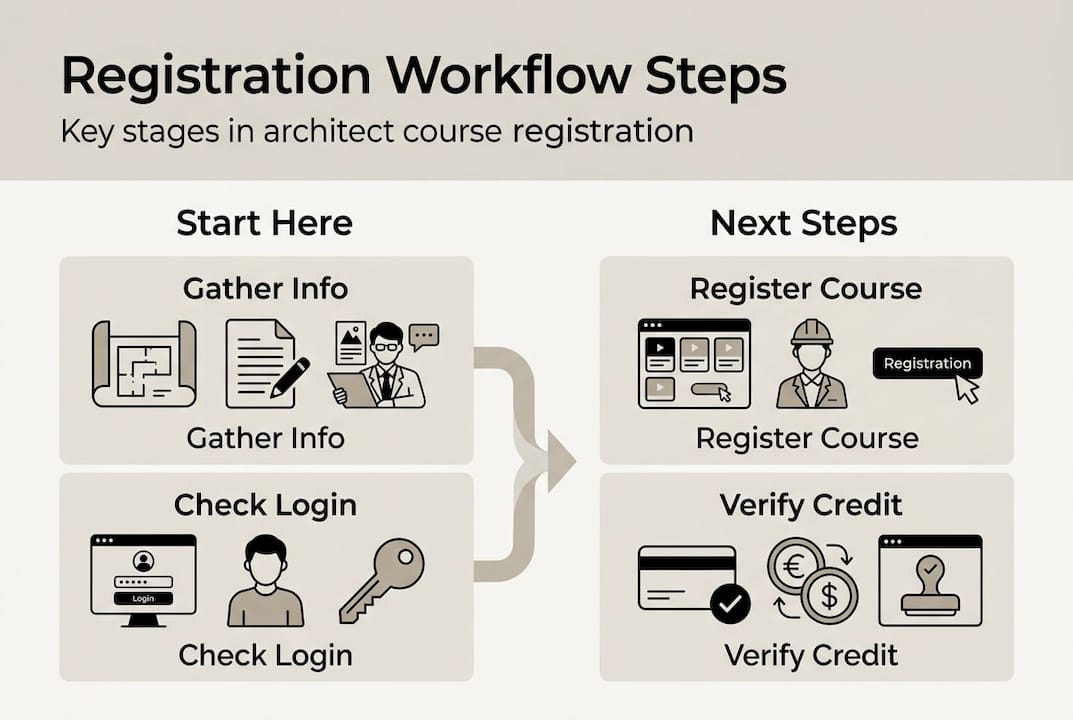
- Step-by-step: Registering for an architect course
- Verification and troubleshooting: How to check and correct registration
- What most guides miss: Real-world pitfalls in architect course registration
- Take the next step with streamlined registration support
- Frequently asked questions
Key Takeaways
| Point | Details |
|---|---|
| Know the workflow | A clear understanding of the registration process helps avoid compliance pitfalls and delays. |
| Prepare requirements | Having all necessary documents and platform logins ready speeds up course registration. |
| Follow each step | A step-by-step approach minimizes errors and ensures credits are properly recorded. |
| Verify credits promptly | Regular transcript checks enable quick correction of any missing course completions. |
Understand the architect course registration workflow
Now that we’ve set the stage, let’s clarify how the workflow is structured and the terms you’ll encounter.
Before you register for a single course, you need to speak the language. The AIA continuing education system runs on Learning Units (LUs), where one LU equals one contact hour of education. A subset of those credits must be Health Safety Welfare (HSW) credits, which address topics directly tied to public protection, things like structural systems, fire safety, and accessibility. Most states require a specific number of HSW hours within each renewal cycle, so knowing the difference matters.
The typical stakeholders in this workflow fall into three groups. First, you have the architects and engineers who need credits for licensure renewal. Second, there are interior designers and contractors who may follow parallel but slightly different requirements. Third, and often overlooked, are building product manufacturers who develop and register courses to get their products in front of design professionals. Each group interacts with the registration system differently, but all roads lead back to the same AIA transcript portal.
What happens when registration goes wrong? Incomplete records can cause credits to be rejected during a state board audit. Duplicate entries can inflate your transcript and raise flags. Missing HSW designations can leave you short of a requirement even when your total LU count looks fine. These are not rare edge cases. They happen regularly, and the consequences range from scrambling to complete makeup hours to actual license suspension.
Tracking and compliance reporting is handled through the AIA’s member portal, where your AIA transcript access process allows you to view, verify, and self-report credits. AIA members can also export transcripts for reporting to third-party platforms like CEBroker, which many state boards use to verify compliance. Understanding this flow from course completion to transcript entry to state board reporting is the backbone of staying compliant.
Here is a quick comparison of the two most important credit types:
| Credit type | What it covers | Typical requirement per cycle |
|---|---|---|
| Learning Units (LUs) | All approved education topics | 18 LUs per year (AIA members) |
| HSW credits | Health, safety, and welfare topics | 12 of the 18 LUs must be HSW |
Key terms every registrant should know:
- LU: One contact hour of approved education
- HSW: Health Safety Welfare designation, required subset of LUs
- Transcript: Your official record of completed courses, housed in the AIA portal
- Self-reporting: The process of manually adding non-AIA courses to your transcript
- CEBroker: A third-party platform many states use to verify license compliance
Gather the requirements: What you need before registering
With the basics explained, let’s get specific on what you’ll need in hand to move through the workflow efficiently.
Showing up to the registration process unprepared is like arriving at a job site without your drawings. You can technically be there, but you will not get much done. Before you begin, pull together the following items.
For architects and engineers, you will need your AIA member login credentials, your current license number, and your state board’s specific CE requirements for the renewal cycle. Not all states align perfectly with AIA’s standard 18 LU requirement, so confirm your state’s rules first. You will also want your existing transcript pulled up, because logging in to AIA Education before you register for a new course lets you spot any gaps or errors before they compound.

For building product manufacturers and course providers, the checklist is longer. You need your course content reviewed and approved under AIA’s guidelines, a clear HSW designation if applicable, a registered provider number, and documentation of your learning objectives. Courses must tie directly to the product’s technical application, not serve as thinly veiled sales pitches. AIA is strict about this, and failing the review process costs time and money.
Pro Tip: Before you start any registration, log in to your AIA account and view your current transcript. Confirm that your most recently completed courses appear correctly. Catching a missing credit before you register for a new one prevents a backlog of corrections later.
Here is a quick-reference table of must-have items:
| Item | Architects/Engineers | Manufacturers/Providers |
|---|---|---|
| AIA member login | Required | Required (provider account) |
| License number | Required | Not applicable |
| State CE requirements | Required | Recommended |
| Course approval documentation | Not applicable | Required |
| Learning objectives | Not applicable | Required |
| HSW designation (if applicable) | Confirm on transcript | Submit during course registration |
Having these items ready before you click through the registration screens cuts the process time significantly and reduces the chance of submitting incomplete information.
Step-by-step: Registering for an architect course
Once you’re prepared, here’s exactly how to move through the architect course registration workflow, step by step.
For architects:
- Log in to your AIA member account at aia.org.
- Navigate to the Education section and review your current transcript for any gaps.
- Search for AIA-approved courses using filters for HSW, topic area, or delivery format (online, webinar, podcast, or in-person).
- Complete your profile if prompted. Incomplete profiles are one of the most common bottlenecks and can prevent credits from posting correctly.
- Register for your chosen course and complete the required payment or enrollment steps.
- Complete the course and pass any required assessment.
- Confirm that the credit appears in your transcript within the provider’s stated posting window, usually 30 days.
For course providers and manufacturers:
- Log in to your AIA registered provider account.
- Submit your course for AIA review, including learning objectives, HSW designation, and content documentation.
- Once approved, publish the course through your preferred delivery channel.
- Report completions to AIA so attendee transcripts are updated promptly.
- Maintain records of all completions for audit purposes.
One feature that saves significant time is the self-reporting process built into the AIA portal, which allows members to manually add non-AIA courses and immediately update their records for licensure reporting. This is especially useful for courses taken through state associations or employer training programs that are not AIA-registered but still qualify for credit.
Statistic callout: AIA’s portal supports immediate transcript updates when members self-report, meaning your compliance record reflects completed education in real time rather than waiting on provider reporting cycles.
Pro Tip: After completing any course, set a calendar reminder for 30 days out to check your transcript. If the credit has not posted, you still have time to follow up with the provider before it becomes an urgent issue.
Verification and troubleshooting: How to check and correct registration
Registration is only half the journey. Here’s how to ensure your credits are accurately reflected and what to do if something goes wrong.
Verifying your registration is not a one-time task. Make it a habit to log in and review your verifying AIA transcript every quarter, especially in the months leading up to your renewal deadline. Look for correct LU values, accurate HSW designations, and proper course titles.
Common errors fall into two categories:
| Common errors | Less common errors |
|---|---|
| Credits not posted after course completion | Duplicate course entries |
| HSW designation missing from a qualifying course | Incorrect LU value assigned |
| Course listed under wrong reporting period | Provider number mismatch |
| Self-reported course not saving correctly | Credits attributed to wrong member |
If credits are missing, start with the course provider. Most providers have a dedicated contact for transcript issues and can resubmit completions to AIA directly. If the provider has already submitted and the credit still does not appear, contact AIA member services with your completion certificate as backup documentation.
“Do not wait until the week before your renewal deadline to audit your transcript. Corrections can take time, and AIA support queues get backed up during peak renewal periods.”
Best practices for staying ahead of errors:
- Save your completion certificate immediately after finishing any course
- Screenshot your transcript after each new credit posts
- Keep a personal spreadsheet tracking course names, dates, LU values, and HSW status
- Set your renewal deadline as a recurring annual reminder
For manufacturers and providers, prompt reporting of completions is your responsibility. Delayed reporting creates friction for your attendees and reflects poorly on your program’s reliability.
What most guides miss: Real-world pitfalls in architect course registration
After mastering the steps, it is worth considering the common traps that even experienced professionals fall into.
Here is something we see repeatedly: architects who have been in practice for 20 years assume they know the process, skip the transcript check, and discover a missing credit three days before their renewal deadline. The steps are not complicated, but complacency is the real risk.
Duplicate reporting is another silent problem. When a course is both reported by the provider and self-reported by the member, the transcript can show inflated totals that trigger audit flags. Always confirm whether a course will be reported automatically before you self-report it.
Deadline confusion trips up architects who practice across multiple states. Each state board has its own renewal cycle, and they do not always align with the AIA’s calendar year reporting. Tracking two or three different deadlines manually without a system is a recipe for a missed requirement.
For manufacturers developing courses, the biggest mistake is treating the AIA registration process as a one-time event. Course content needs to stay current, learning objectives need to reflect actual product applications, and provider accounts need active management. A course that was compliant three years ago may not meet today’s standards.
Our honest advice: treat your transcript like a financial account. Review it regularly, reconcile it after every course, and never assume everything posted correctly just because you completed the work.
Take the next step with streamlined registration support
Having learned the full process, here’s how you can get extra help and ensure ongoing compliance.
Navigating AIA course registration does not have to feel like a solo effort. At RonBlank.com, we work directly with architects, engineers, and building product manufacturers to simplify every stage of the continuing education workflow.

For professionals seeking credits, we offer AIA-approved online courses, webinars, podcasts, and face-to-face programs designed to fit your schedule and satisfy both LU and HSW requirements. For manufacturers, we help you develop, register, and deliver compliant courses that put your products in front of the right specifiers. Whether you need AIA course registration support or a full course development partnership, we are here to make the process straightforward and effective. Reach out and let’s build a workflow that works for you.
Frequently asked questions
How do I access my AIA course transcript?
Log in at aia.org, go to Education, and select View Transcript to access your records and track LUs/HSW for licensure reporting.
Can I self-report non-AIA courses for credit?
Yes, AIA allows members to self-report non-AIA courses for Learning Unit credit directly through the transcript portal in your member account.
What should I do if my course credit isn’t showing in my transcript?
Contact the course provider first with your completion certificate, then reach out to AIA member services if credits remain missing, since AIA transcripts are used for official licensure reporting.
Why is proper registration important for architects?
Accurate registration ensures compliance with state board requirements, supports smooth licensure renewals, and protects you from lapses in required education credits that could jeopardize your license.